Unofficial developer reference
Autelis BN100
Jandy / Zodiac PDA HTTP API
Field notes for talking to Autelis Pool Control for Jandy/Zodiac PDA
over HTTP. This product emulates a Jandy PDA remote on the RS‑485 bus and exposes
a web keypad — not the richer status.xml circuit API used by Autelis RS units.
1. Hardware identity
The unit documented here is labeled Pool Control for Jandy/Zodiac PDA, model BN100. It connects to the pool panel with a 4-conductor RS‑485 lead (terminal block marked GYBR), Ethernet for LAN access, and a separate power input.
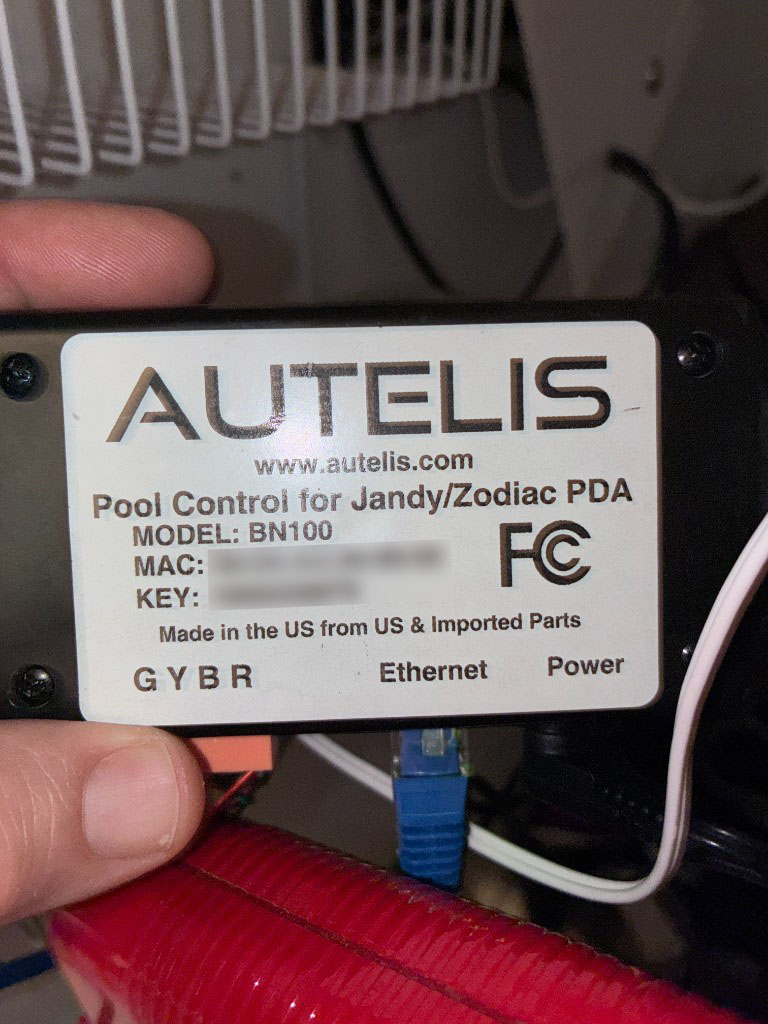
| Field | Value (this unit) |
|---|---|
| Product | Pool Control for Jandy/Zodiac PDA |
| Model | BN100 |
| Vendor site | www.autelis.com (historical; product line discontinued) |
| Example MAC | 00:04:A3:39:89:02 |
| Panel link | RS‑485 via GYBR terminal (4-lead wire to Jandy/Zodiac PDA bus) |
| Network | Ethernet (HTTP, typically port 80) |
| Default hostname | poolcontrol (LAN; try http://poolcontrol/) |
Why this matters: community integrations (openHAB, Home Assistant, etc.) mostly target Autelis RS / Pool Control firmware with equipment channels in status.xml. The PDA SKU behaves differently: the useful automation surface is the keypad emulator.
2. Architecture
Intelligence lives in the Jandy/Zodiac outdoor control panel. The physical PDA (and this Autelis) is a dumb terminal: it receives display updates and may return a single keypress on each bus cycle. Autelis bridges that RS‑485 conversation to HTTP so a browser or app can act as the remote.
iOS / browser / script
        │  HTTP (Basic Auth)
        ▼
   Autelis BN100  ──Ethernet──► LAN / WAN
        │
        │  RS-485 (GYBR, 4-lead)
        ▼
 Jandy / Zodiac Aqualink panel
        │
        └── pumps, heaters, auxiliaries, menus, …
Observed Autelis web UI version on System Information: 1.0.2.
PDA firmware string seen on splash: PPD: PDA 2.6.1.
3. PDA vs RS Autelis products
| BN100 PDA (this doc) | Typical Autelis RS / Pool Control | |
|---|---|---|
| Role | Emulates AquaPalm / PDA remote | Exposes named circuits, temps, pumps, chem |
| Primary API | /keypad.xml + /keypad.cgi |
/status.xml, /names.xml, /set.cgi, … |
| Web UI | keypad.htm, systeminfo.htm, settings.htm |
Dashboard-style equipment pages |
status.xml |
Often minimal (e.g. version only) | Full system / equipment / temp tree |
| Control model | Navigate menus with Up/Down/Select/Back | Direct on/off and setpoints by name |
4. Authentication & transport
- HTTP on port 80 by default (HTTPS not observed on stock BN100).
- On a local network, the default hostname is
poolcontrol. Clients can usually openhttp://poolcontrol/; use the DHCP IP if name resolution is unavailable. - HTTP Basic Authentication on protected resources (
401 Unauthorized: Password requiredwithout credentials). - Factory-ish defaults are commonly discussed as
admin/admin; change them. Do not embed real passwords in published clients. - iOS / modern browsers need App Transport Security exceptions (or a TLS reverse proxy) for cleartext HTTP.
Authorization: Basic base64(username:password)5. Built-in web UI map
| Path | Purpose |
|---|---|
/systeminfo.htm | System information (includes Autelis version string) |
/settings.htm | Device settings |
/keypad.htm | PDA keypad UI (source of truth for this API) |
/ajax.js | Shared XHR helper (gzip-compressed on device) |
/autelis.css, /autelis.png | Static assets |
6. GET /keypad.xml — LCD snapshot
Returns the current emulated PDA display. The stock UI polls this about every
100 ms when awake (slower in sleep). Pass the document element of the
XML response into your parser (same as updateKeypad(xmlData) in keypad.htm).
Example (active menu)
<response>
  <b0>     SUN  4:07PM</b0>
  <b1>AIR         POOL</b1>
  <b2> 93`     85`    </b2>
  <b3></b3>
  <b4>POOL MODE     ON</b4>
  <b5>POOL HEATER  OFF</b5>
  <b6>SPA MODE     OFF</b6>
  <b7>SPA HEATER   OFF</b7>
  <b8>MENU            </b8>
  <b9>EQUIPMENT ON/OFF</b9>
  <b10></b10>
  <b11></b11>
  <hll>4</hll>
  <effects>15,13,15,0</effects>
  <offset>0,0,0</offset>
  <sleep>0</sleep>
</response>
Fields
| Element | Meaning |
|---|---|
b0 … b11 |
Text buffer lines. The web UI shows 10 visible rows (kptxt0–kptxt9), optionally remapped via offset. |
hll |
Highlighted line index for the visible screen. Values ≥ 10 (often 15) mean “no highlight” (splash / idle). |
effects |
Comma list: line,start,end,style. Style 1 = background emphasis; 4 = underline (per keypad.htm). Ignored when indices are out of range. |
offset |
Comma list: shift,start,end. When shift > 0, visible rows in [start,end] read from buffer index i + shift with wrap inside that window (scroll region). |
sleep |
1 = sleep mode (show “SLEEP MODE / Press a key…”); 0 = awake. |
“Not ready” frames
keypad.htm skips updates when xmlData.childNodes.length < 15, then retries
after 50 ms (1 s while sleeping). Clients should keep the last good frame instead of
blanking the UI on short/partial documents.
Special characters (display mapping)
The web UI remaps buffer glyphs before display:
| Raw | Shown as |
|---|---|
_ | ↓ |
^ | ↑ |
` (backtick) | ° |
> or } | → |
{ | ← |
7. GET /keypad.cgi?key=N — keypress
Injects a PDA key into the Autelis→panel conversation. The stock UI calls this from
doButton(num) and does not wait for a new screen; continuous
/keypad.xml polling picks up the result.
Successful responses are a tiny body (observed: literal 1).
| key= | UI label | Notes |
|---|---|---|
0 | (power / unload) | Sent from window.onbeforeunload as doPower() |
1 | 1 | Soft key |
2 | Back | |
3 | 2 | Soft key |
4 | Select | Also keyboard Enter / Space / → |
5 | Dn | Down |
6 | Up | Up |
GET /keypad.cgi?key=6×tamp=1710000000000
Authorization: Basic …One key per bus cycle. The panel handshake is on the order of ~1 Hz. Sending Up/Down faster than that drops presses — symptoms: highlight moves once, then appears stuck. Pace keys ≈ 0.8–1.0 s apart (or queue/coalesce navigation).
8. GET /status.xml (limited on PDA)
Present and authenticated, but on BN100 PDA firmware it may only expose a thin
system tree (commonly just a version such as 1.0.2). Do not assume
RS-style equipment / temp channels exist.
Related RS-oriented endpoints (/names.xml, /pumps.xml, /chem.xml,
/set.cgi) are not the primary control path for this SKU and may 404 or be empty.
9. ajax.js conventions (important for clients)
The device ships a small XHR helper. Two behaviors matter for third-party clients:
-
Cache busting: every request appends
timestamp=<epochMillis>(using?or&as needed). Without this, proxies orURLSessioncaching can freezekeypad.xmlafter the first frame. - Async completion polling: requests are opened asynchronously; a 250 ms timer drains completed XHRs. Treat Autelis as happiest with serialized or lightly concurrent traffic.
// Equivalent cache-buster
url += (url.includes('=') ? '&' : '?') + 'timestamp=' + Date.now()
Also set Cache-Control: no-cache / use an ephemeral URL session where possible.
10. Timing & reliability checklist
Do
• Poll /keypad.xml ~100–250 ms when awake
• Pace keypresses ~1 s
• Always add timestamp=
• Keep last good LCD if a frame looks incomplete
• Send key=0 when tearing down a session (optional, matches browser unload)
Avoid
• Bursting Up/Down without delay
• Interleaving many parallel GETs on tiny firmware
• Assuming RS /set.cgi?name=circuit… semantics
• Publishing credentials or open WAN admin/admin
11. Client examples
Examples use the default LAN hostname poolcontrol. Substitute the DHCP IP (or a forwarded hostname) if that name does not resolve.
cURL — read screen
curl -u 'USER:PASS' \
  "http://poolcontrol/keypad.xml?timestamp=$(date +%s000)"
cURL — press Select
curl -u 'USER:PASS' \
"http://poolcontrol/keypad.cgi?key=4×tamp=$(date +%s000)"Pseudo-client loop
connect with Basic Auth
loop every 200ms:
GET /keypad.xml?timestamp=now
if sleep == 1: show sleep UI; continue
if childCount < 15: keep previous frame; continue
render b0..b9 with offset + hll + effects
onKey(code):
wait until ≥900ms since last key
GET /keypad.cgi?key=code×tamp=now
# do not require an immediate xml refresh; next poll updates LCD12. Limitations & unknowns
- This is an unofficial reverse-engineering note from a live BN100 +
keypad.htm/ajax.js. Autelis no longer publishes a maintained PDA command manual. - Exact XML root handling and “not ready” edge cases may vary by firmware build.
- Soft keys
1/2are context-dependent (menu-defined). - No UPnP/discovery procedure is documented here. On the LAN, start with the default hostname
poolcontrol, then fall back to the DHCP IP. For remote access, use a forwarded hostname. - Exposing the device on the public internet requires strong credentials and ideally a VPN or authenticated reverse proxy — the stock stack is cleartext HTTP + Basic Auth.
Related open projects (RS‑485 / PDA context)
- earlephilhower/aquaweb — DIY PDA/screen emulator over serial (similar UX, different transport).
- aqualinkd/AqualinkD — broader Jandy RS‑485 protocol notes.